You change it once. Every tool picks it up.
A new tool, skill or rule goes through a pull request into the Stack Map and your profiles. The Chief of Staff syncs it to every AI tool, writes your folder files, checks health and opens fixes for you to approve.
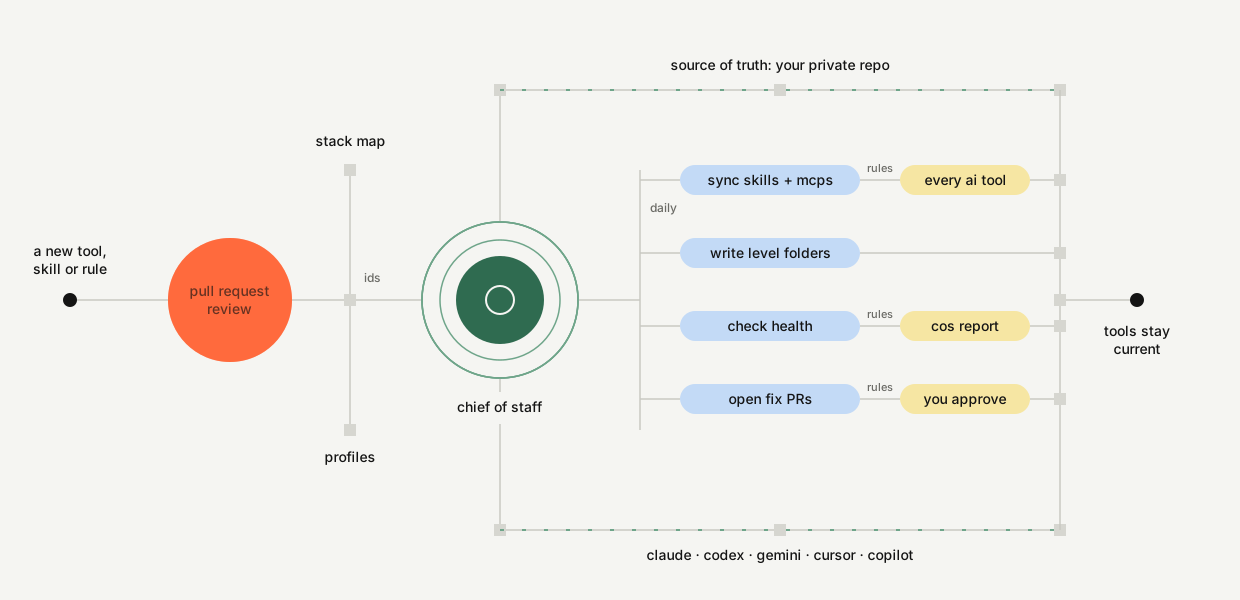
Five parts, one repo.
Stack Map
Every agent, skill, connector, MCP server, plugin and API, each marked Installed or Not-Installed, with how it connects and what it is for.
Profiles
Global, organization, department, individual. Each level lists its tools and inherits the level above.
Level files
README, INDEX, SKILLS, CLAUDE, AGENTS and GEMINI in every level's folder, each saying only what that level adds.
Chief of Staff
One health report: broken keys, stale tools, drifted files, old pull requests, a stopped sync. Fixes arrive as pull requests.
Every AI tool
Skills and MCP servers install into Claude Code, Codex, Gemini CLI, Cursor, Copilot and Hermes every morning.
Lean sessions start with lean folders.
Mirror your profiles in your folders. AI tools read instruction files from the folder you work in and the ones above it, so nothing is ever repeated.
~/                         Global  home-file rules + global SKILLS.md
└─ Work/
   └─ Acme Builders/       Organization
      ├─ README.md         what this folder is
      ├─ INDEX.md          level above, levels below, files here
      ├─ SKILLS.md         tools, Installed / Not-Installed
      ├─ CLAUDE.md         this level's rules, then @SKILLS.md
      ├─ AGENTS.md         same rules for Codex, Cursor, Copilot
      ├─ GEMINI.md         same rules for Gemini
      └─ sales/            Department  (same six files)
         └─ people/jane/   Individual  + writing style, outcome goal
~/code/<repo>/             repos keep their own CLAUDE.md
- Nothing repeatedA department file never copies the company rules; tools load the folders above.
- Only your branch loadsWorking in sales loads Global, company and sales. Not every department.
- Small files, better follow-throughEach file says only what its level adds.
- Your edits are safeHand-edited generated files are kept and reported, never overwritten.
- Tools know what existsSKILLS.md tells the AI what is connected and what is still planned.
Terminal, IDE, desktop and web.
Checked against each vendor's documentation on 27 September 2026.
| Surface | Type | Reads | Chief of Staff |
|---|---|---|---|
| Claude Code | Terminal, VS Code, JetBrains | CLAUDE.md here and above, skills | Full |
| Codex CLI and IDE | Terminal, IDE | AGENTS.md from the repo root down, skills | Full |
| Gemini CLI | Terminal | GEMINI.md here and above, skills | Full |
| Cursor | IDE | AGENTS.md, shared skill folders | Full |
| VS Code with Copilot | IDE | AGENTS.md and CLAUDE.md (settings on), skills | Full |
| Claude desktop, Cowork | Desktop | Folder instructions, account skills | Full with a folder |
| Hermes Agent | Harness: terminal, chat apps, cron | AGENTS.md here and up to 5 folders above; SOUL.md global; shared skills folder | Full |
| Gemini Code Assist | IDE | Markdown context files | Partial |
| claude.ai, ChatGPT, Gemini app | Web, mobile | Account skills; no local folders | Report only |
About ten minutes.
macOS or Linux, Python 3 and git. The starter kit is shared by invitation; ask for read access, then make your own private copy.
Use this template on GitHub, keep it private, and clone it to ~/code/toolshed.
bash scripts/setup.sh asks a few questions and asks before writing anything.
Commit and push. The check runs on every pull request.
"Run the Chief of Staff." You get one report and one next action.